
Hello everyone, welcome back! Loads more excellent progress to report on this week about the local map clue generation, I’m pleased to say. I’ve incorporated a ton more generators into the overall dictionary which now houses all the generative materials – now into the many hundreds, actually – and continued to refine the system by which all possibilities, when being pre-generated, are funneled into a single translation function that then outputs them in a manner which can be understood no matter what the generative materials are or where in the game they are coming from (if you have NO IDEA what I’m talking about, last fortnight’s entry should be rather useful in that regard). I’ve also added loads of detail for what can show on the local map clues, including a whole ton of objects which just weren’t registered previously and couldn’t appear correctly until now, and indeed code for keeping track of the brick colours and floor colours which should be used when a local map clue is being generated. Beyond that, I’ve also been ensuring that building interior maps will always generate with abyss tiles outside of them (i.e. in this game’s equivalent of “out of bounds” areas) because otherwise there could be significant confusion generated for the player if they are given a local map clue that shows an out-of-bounds area… but they can’t access it and there’s nothing there. So, a ton has been done in this fortnight (and indeed one thing worth discussing from last fortnight, too), so without further ado, let’s get into it:
All possible local map tiles
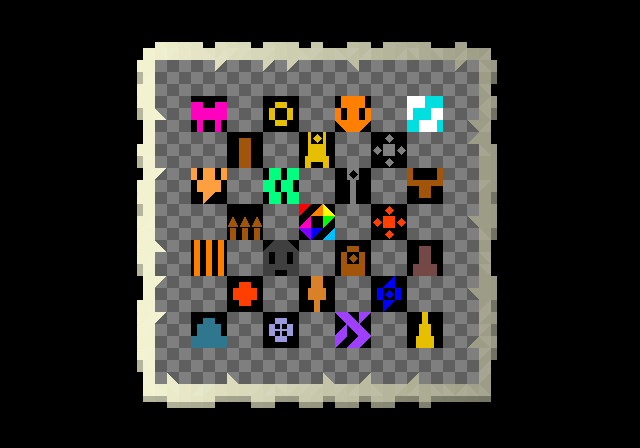
Firstly though, I want to cover something I actually should have covered in the previous update, but I forgot to in all the excitement to describe and cover the output of the local map generator (and also perhaps because that entry had already become more than long enough by the time I’d finished typing all of that out). In the earlier proof-of-concept variations of the local map clues I showed off the “graphical” equivalents for a lot of map tiles, such as the various parts of trees, different kinds of terrain, walls, doors, and so forth. However, it became clear here that there were actually lots of things not being caught in the converter here, including a bunch of much more obscure terrain types, such as the shop stall terrain type (listed in-game as terrain type “16”), various objects which are extremely rare but can generate in a couple of circumstances, and also things that haven’t yet been implemented into the game. In 0.12 I plan to give each civilization an additional unique trait, generally but not always buildings, such as the construction of obelisks in their lands, or a fondness for hookahs, or the construction of pyramids, or tapestries on their walls – or whatever it might be. This’ll be great for worldbuilding and enhancing clue variety (and emphasizing the difference between nations as well), but since these aren’t in the game, they were largely missing from the converter. I therefore added these in as well, though to do so I had to create a new system which uses two grids instead of just one to track the local map information, because I’d exceeded all the characters a-z, and A-Z, and 0-9, and all the symbols and punctuation on the keyboard! This didn’t slow things down much, but did need doing, and while these additions will not therefore fully deliver this year / in 0.11, they will deliver later on when the time comes to develop those generators and integrate them both into the game world and into the generation of clues and riddles. Happily now because of this work, I then won’t have to come back and think about these elements of the game’s code all over again – and I’ve now got code in place for adding any other new stuff in the future that would need to appear on a local map, but I haven’t even thought of yet! It therefore did add a fair bit of time in here, but saves me even more time than that later, so I definitely felt this was all worth doing at this point in the process. To demonstrate this, here’s an example of an imagined grid showing rather a lot of things which aren’t presently in the game. (I have shown off some of these extra symbols before, but the difference now is that they can actually generate into a local map clue successfully when given the appropriate prompts, even if the in-game objects don’t actually exist yet!).
Another component that needed to be fixed this fortnight, however, was to do with layering. I mentioned last time that sometimes you might of course have several things stacked on a tile, such as the terrain (which in this regard counts as one thing that tile “is”, in the sense of “what is at these x and y coordinates?”), or a feature or object (such as a table or chair), but also might sometimes spawn with an item on it, such as holy books spawning on tables in religious buildings, which then gives us three layers (terrain, table, book). This would also apply in the future when I’ll be spawning in some other things that appear on tables or dressers in certain nations, i.e. things like canoptic jars, or hookahs, or various other features that will be one-nation-specific. However, in testing this week I realised that I needed to implement some kind of “ranking” system to ensure the game understands what should be shown on a local map clue when there are many things stacked up on a pile. As it turned out, the parliamentary clues were always correctly showing tables and chairs simply because they were listed first for the tiles in question, but if they were listed second, it prioritised the terrain instead of the features (as I discovered to my horror when trying to generate a clue in a non-generated court, and just being greeted with an empty room with no room for anybody to sit). As such, there are now three “ranks” for things that might appear on these – things which can only appear on top of another feature (as noted above), features, and terrain, and it’ll look at what would spawn on each tile and work down the list, from the top, going to the bottom. This didn’t take too long to implement but I’m glad I caught it early, since otherwise adding more complexity into the generator later, having missed this rather important facet, would have been a real pain. With this sorted, therefore, the “upper most” (from a top-down perspective) thing is now always used for the clues (although I don’t think I’m going to have books appear on these local maps, or things sold in shops, since they vary – items won’t appear but features, like a canoptic jar, will).
More examples for testing
Next, having implemented just the parliamentary generator into the broader system for taking the generator materials and creating clues out of them, I went through my list of generators that were ready to be implemented, and implemented them all. This began with the other six buildings whose interior generators, while never “simple”, are simple enough that their transition into this broader generative system is relatively complex. Alongside the parliamentary buildings, then, it was also warehouses, hospitals, farmhouses, courts, and stables. These didn’t take long to get in there and I was quickly able to test them out in the abstract, ensuring that all of the grids and generative materials translate correctly into the universal format (again – see last week’s entry for more elaboration of what I mean by this) and then into the local map graphical format. These all looked great, and I appreciated the variation they showed, but it also really showed the importance of two things. Firstly, these (as with other clues) of course need to be coupled with other clues to give the player more relevant information. Plenty of buildings have tables and chairs in them, and while in the future I can anticipate a really experienced player being able to say “hmm, that looks like a court’s layout instead of a parliament’s layout”, that shouldn’t be required. Secondly, there is significant importance to making sure that colour variations are used to give extra information, and to make the clues more visually varied as well. A great example of this is in the colouring of the “swanky flooring” terrain type inside buildings; I had this as a default showing a bright pink and a darker purple, but I’ve now implemented some code to actually take a look at what the floor colours would be for swanky floors in that nation, and have them correctly reflected by picking one colour at random from the nation’s flag, and using that as flooring. To illustrate the point, here are three clues for inside buildings with swanky floors using the different colours… and, in fact, using the different brick colours as well!
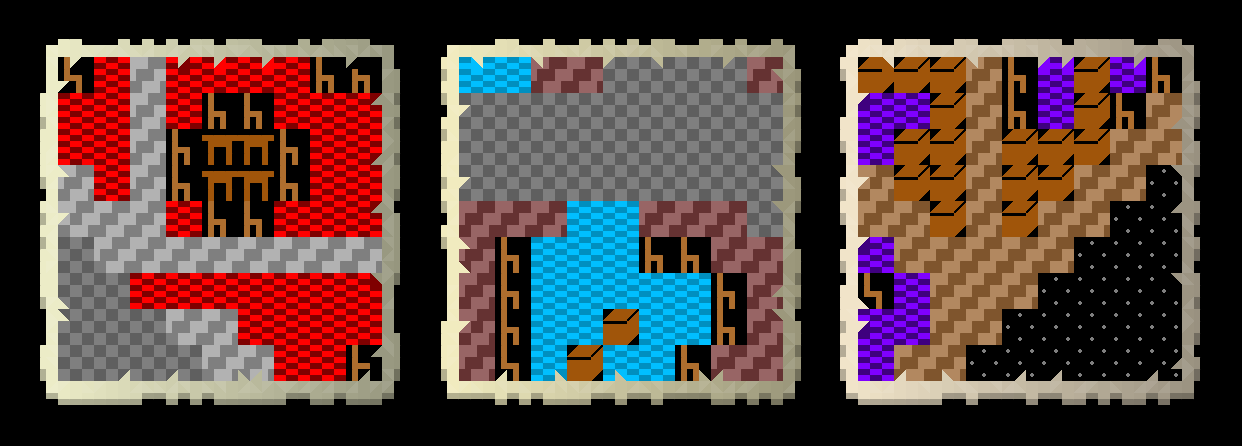
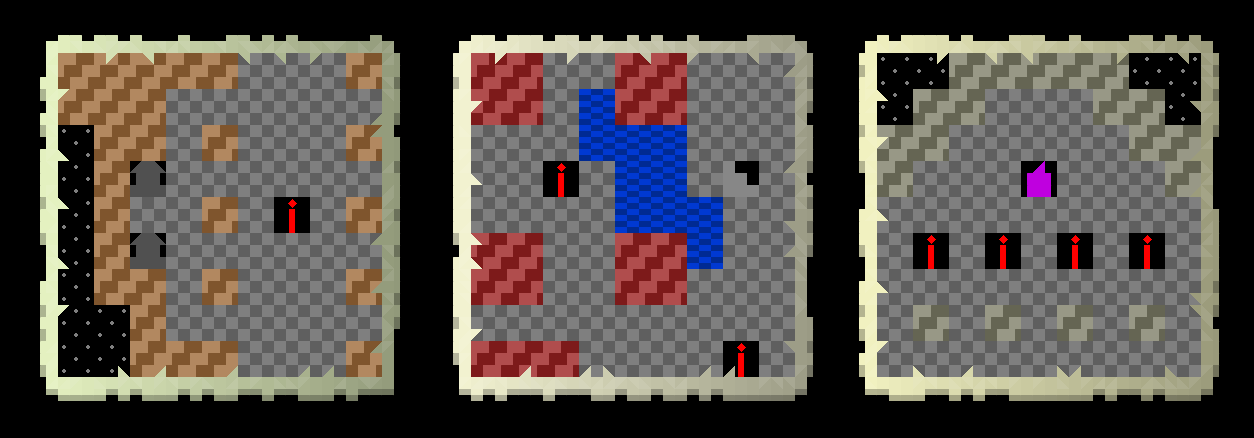
I think this is much better, and less ambiguous, than a default colour. A similar thing also arose for furniture, because there are around a dozen different wood types and different wood types are used for furniture in different biomes – not to mention the entirely new wood types I’ve also recently implemented into the game, of course – and a building with a lot of chairs or tables can look a little flat and generic when you’re looking at the clues. There’s potential for some cool rare variations here. For example, I might add in something like a 1/20 chance where any major building in a city centre is going to be using of the special rare woods for its furniture instead of the generic woods, and then that would be something distinct which would appear on any clues pointing towards that area. I know I’ve discussed this at length (and I know this isn’t a unique insight about making roguelike / roguelike-adjacent games, to be clear), but a really good design technique is to have lots of extremely unlikely events in these kinds of games. Their extreme unlikeliness makes them noteworthy and memorable when they happen, and adding in a good number of these raises the chance of the player encountering at least one of them in a game, which is always an interesting moment. This is a very minor example, of course, but I really like this idea as another way to add variation to buildings (e.g. parliaments, mints, mansions, manors, mercenary guilds, banks, etc) that would have a logical reason to, very rarely, use some much swankier wood than the norm, and would also enhance clue generation in that context as well. I haven’t tackled that yet – but I will. I then shifted onto some other generators, and such as these three experiments generating a local map clue for a component of a crypt (you’ll see here the floor, the walls, candle stands, a couple of sarcophagi, a staircase, and indeed some water in one that has partly flooded, and would now indeed be generated with that partial flooding included):
And then here we have a bathhouse, farmhouse, and icehouse – the fact these all have “house” in the name is entirely coincidental – it’s just that they all have wooden flooring…
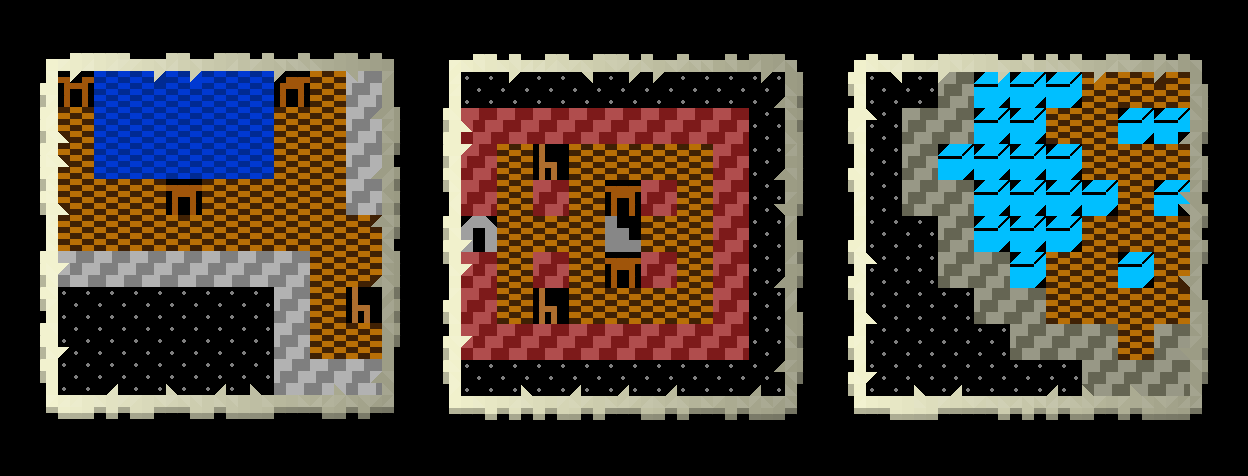
…which I do think are also looking rather handsome. The floor and wall variation are both, I think, bringing a lot of interesting detail, and the same should be true of the different types of wood for furniture as well, once I actually get around to adding that variation in (and that is a potentially rather complex one, again because of how the whole thing generates, so unless I have some kind of extraordinary mental breakthrough in this regard in the coming weeks, I anticipate leaving that until well after 0.12 – generate wood colours will suffice for now), as well as things like the colouration of altars, or vases, or other objects that can potentially appear with a range of shades in the player’s actual vision. Once again, as with so much else, my hope is that over time, experiencing certain civilizations across multiple quests, the observant player should come to recognise particular styles and combinations of colours as belonging to this civilization or that religion, and these should both significant help with clue-solving, as well as building that wonderful sense one sometimes gets in games of coming to understand the game world, no matter how challenging or opaque it first appeared. Alongside these colour variations and the differences in the floor types here, it’s also very pleasing to see the outside abyss areas working correctly, which again the player should never ever see when actually exploring a building – something would have to go badly wrong for them to phase through one of the walls and access the “outside” of that map grid! – but are required here to ensure that the generate can very clearly visually distinguish between the inside and the outside of these structures. However, this in fact turned into a major task for this last fortnight, to which I now turn…
More abyss
A major task in this fortnight, as noted above, has been ensuring that when building maps generate, they always generate with the “abyss” terrain type outside the building – i.e. in what we’d call the “2”out of bounds” areas in 3D games. This hasn’t been important until now, because the player had no way of either moving or seeing outside of the intended areas of a building. To make clearer what I mean by this, imagine an octagonal building, but it’s being stored on a square map grid (or a rectangular one). This means the areas of the map outside the corners of the building aren’t in the area the player is actually walking around on, but still physically exist within the game world – the player just can’t see or access them. This didn’t matter in the slightest… until, suddenly, we need to generate clues which are using these generative grids that create in-building maps. If terrain on both sides of a wall is something the player could walk around, there’s no way for the game to know that it shouldn’t show one side, or should show one side in a different way, and would instead show both sides, thus hitting two unfortunate traits: it would show the artificiality of the game-world, and it would also be potentially confusing. This meant that every single generative grid – and there are at least high hundreds, if not actually thousands – needed a way to clearly delineate what is inside and what is outside; what should the player be seeing, and what should they not be seeing. This seemed, at first, like an easy task, as my first thought was to try to automate this somehow – for example, I could have every generator spawn some kind of system in an area which it knows is outside the intended area the player should be walking around in (I would have to manually input those locations, which would be time consuming though not particularly cognitively demanding) and then flood-fill the area with abyss tiles so that I don’t have to fill them out. However… this quickly ran into issues with a lot of possible edge cases. The most obvious was generator grids with multiple non-building areas, e.g. buildings with outdoor courtyards in them. How do we handle those? Equally, the meaning of different characters is different across different grids, so that would have to be taken into a account as well, though that part wasn’t too hard… but then the real problem came through, which was that plenty of generator grids had “mess” in them outside the part the player sees, i.e. walls or stuff that was there from earlier versions and ideas and I never removed, because the player would never see them.
How, then, to account for those? I soon realised that there was actually no generic flood-fill type application I could write that would account for all possibilities in this context… and that, obviously, was a problem. This left me with two options. One option would be to write a partial flood-fill function and apply that to all the generative grids – this latter being a time-consuming part in its own right, although not wildly painful – and then do the remaining unusual edge csaes by hand. That would, of course, necessitate my going through all the grids and seeing whether or not they had correctly flood-filled with abyss, which would again be time-consuming, and would rely on me actually noticing all the mistakes. When looking through potentially a thousand components or more, and just being realistic about the fact I am a human being with a finite attention span, I felt the chance of missing something doing it this way was not trivial – as well as the fairly complicated task of creating this flood-fill function for grids of arbitrary size, containing arbitrary characters with arbitrary meaning, and never over-filling or under-filling what should actually be filled. All getting a bit complex. The other option, of course, was just to go in and do it all by hand, i.e. try to find the most effective ways possible to rapidly fill up these grids all with some new character not used in that particular generator with a character that would denote abyss, and then it would simply just know to spawn abyss tiles there when generating the building itself, and to use the little abyss graphic when creating a local map out of the available material. I pondered this a little while, and although the function I’d write to do this job sort of took hold in my head… in the end, I genuinely felt it was going to be faster doing it by hand (and as a secondary concern, would be so cognitively undemanding that it might keep my brain free for other things later on – I often feel quite keenly that one has a finite level of brain power in a day, and that wasting none of it on this would hopefully allow me to get into a sort of zen state of just churning through this boring task, hour after hour, while leaving my mind to wander onto other things). So, with the decision made, I then had almost a thousand generative string grids to tackle, in order to turn them all from something like this…
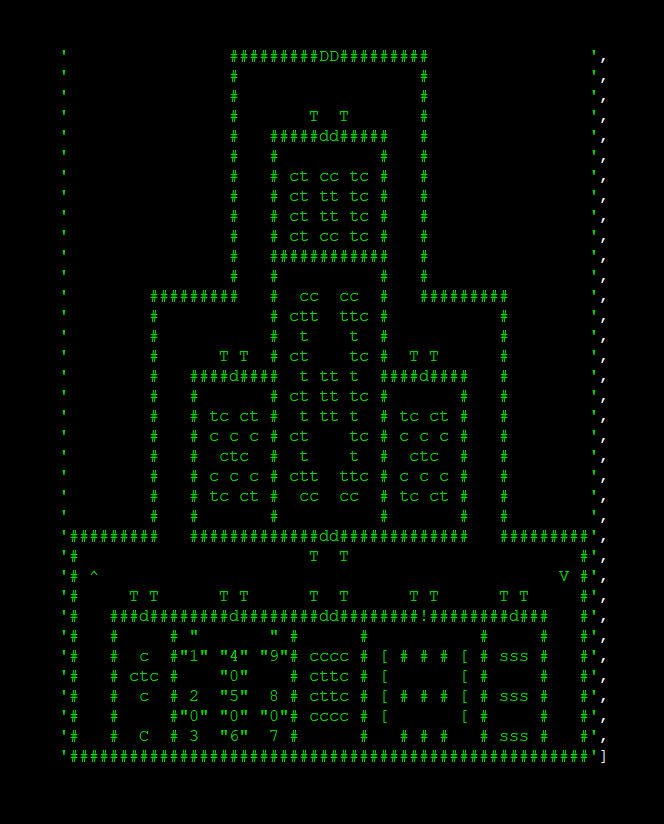
…into something like this…
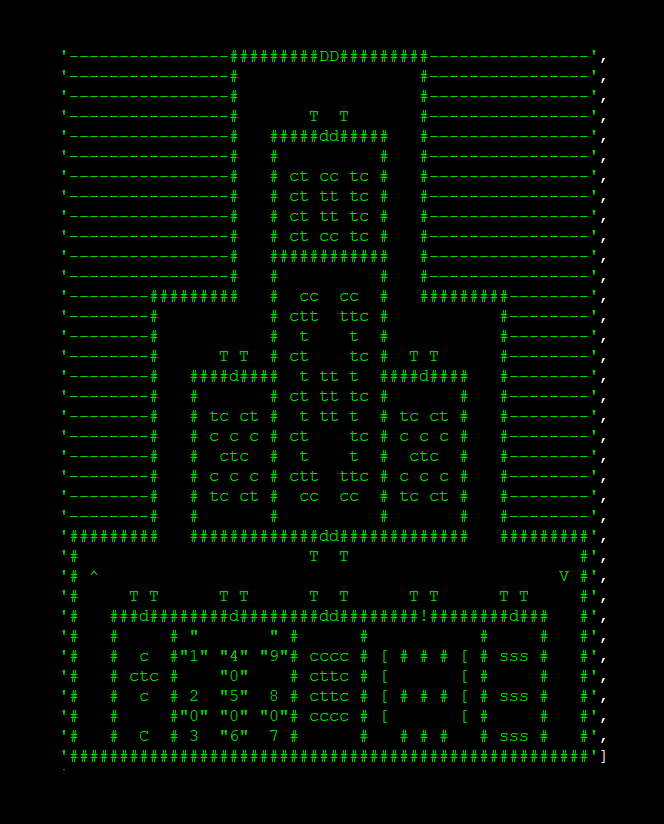
…or some equivalent (in some generators “-” is already being used, so I’ve had to find a different character for each generator, and ensure again that the ur-dictionary knows what character counts as abyss in each generator for when pre-generating the content of that generator in order to create a clue from it (whew!). As I say, this is the case for literally hundreds of grids across dozens upon dozens of different generators. None of this has been an issue until now because all these empty areas did exist, and did contain flooring, and thus broke the suspension of disbelief of the game’s buildings in a certain sense, the player could never actually access them – i.e. they were URR’s equivalent of out-of-bounds areas in 3D games. However, the core insight here is that in the creation of local map clues, it is now possible for the player to see outside of the confines of a building that you would actually be walking around in, and into the “void” outside the building… and so if the player saw a clue suggesting that there was flooring out there, it would look rather strange! And aside from being strange in a suspension of disbelief way, it would also be strange in terms of actually understanding the clue – I could definitely see problematic scenarios in which a player thought the flooring on both sides of a wall was real, and thus confusing the ability to locate its actual location. Shifting the outsides of building maps into the abyss terrain type therefore both ensures that players cannot be confused about what being shown in a local map clue is actually inside the building they’re meant to be looking in and what is outside, while also making sure the game doesn’t accidentally show, via the generation of local map clues, that interior building maps aren’t actually just the building itself. The problem, however, was the sheer damned number of these that need doing. As I post this entry I’ve done hundreds, with a few left, but overall pretty much every building generator has had all its generation grids updated in this way, as part of readying them to be moved out of their individual functions, and into the larger building dictionary (and thus valid for clue generation). No matter how efficiently and cleverly I use Ctrl+C, Ctrl+V, Ctrl+F, Ctrl+H, and just typing directly in, this has been a massive job.
However, it is with great pleasure that I can say this job is entirely done, aside from the generator grids of castles and religious buildings, as those two are both wildly complicated and have hundreds of grids by themselves to generate from, and that’s just damned time-consuming. That doesn’t mean it’s not being worked on, of course, and should be done by the time I upload the next entry, but every other possible interior building type – aside from a handful of strange ones which generate in strange ways, but that’s only three out of around forty building generators – do now correctly always generate abyss in the non-player sections, and thus always look correct when a local map clue is generated using them. Of course, I say “always” – I am confident, but naturally I’m going to need to, at some point, just set the generator going, churn out a thousand, and then rapidly look through them to see any bugs… but we aren’t quite there yet. The important point is that all buildings (except those three) will now look correct on local maps, and cannot either confuse the player, or break the suspension of disbelief. As an aside here, in the process of adding all these abysses to hundreds upon hundreds of generation grids, I was genuinely blown away when doing this by the level of generative detail that castles, mansions, crypts, and religious buildings, have. These are four of the most extraordinary generators I’ve written for interior areas – the first two of these are well into the hundreds of thousands by my count (though with major differences between most permutations), while the latter two are well into the millions, billions, probably more. This is a great reminder that these are some of the richest and most varied indoor areas, and thus ones we really want to use for riddles as much as possible for precisely that reason (and they all integrate nicely with other things, too – castles with a nation’s politics and leadership, ditto mansions, crypts with history and religions, and religious buildings, obviously, with religions).
Adding more generators to the generator dictionary
With that done, I also spent time adding more and more building generators to the generator dictionary, i.e. the overall database of materials the game will be able to extract information from, use to create a clue, and then “force” the use of later on when the game actually generates, you know, whatever it is that the clue is talking about. Again, I’m pleased to say I gave this many tens of hours in this fortnight, and a ton of extra buildings and outside generators as well have now been moved over to this new system. Like some of the other stuff above, the cognitive load on this task isn’t huge – it’s higher than the abyss work, for sure, but not wildly hard so far – but it is time-consuming, and requires me to refamiliarize myself every single time with how every single generator works, so that it can be intelligently put into the larger dictionary and all its components parts and their component parts can be appropriately labelled and understood for the local map clue generator, should it decide to pluck one of them out and create something with it. With a ton of this done, however, I soon found that some of the building generators simply were a bit more complex than others, and ditto some of the outdoor generators as well, so I went over everything missing and made a list of what I hadn’t yet managed to convert. You can see its state from a few days ago in the image below – this might seem like a lot, but it’s well below 50% of the total generators, and so we have plenty of stuff to test the working with and to generate local map clues for 0.11, even if I don’t wind up going back to these. I’ll explain the notes in a moment, but you’ll see that five up at the top immediately seemed like the most approachable of the remaining set, so it was these I then finished off towards the end of the last 14 days. Also, yes, I have indeed genuinely lost the ability to understand how monasteries generate – I looked back over the generator, several times, and I genuinely could not fathom how it actually works, so we’re abandoning that one for now and will come back later.
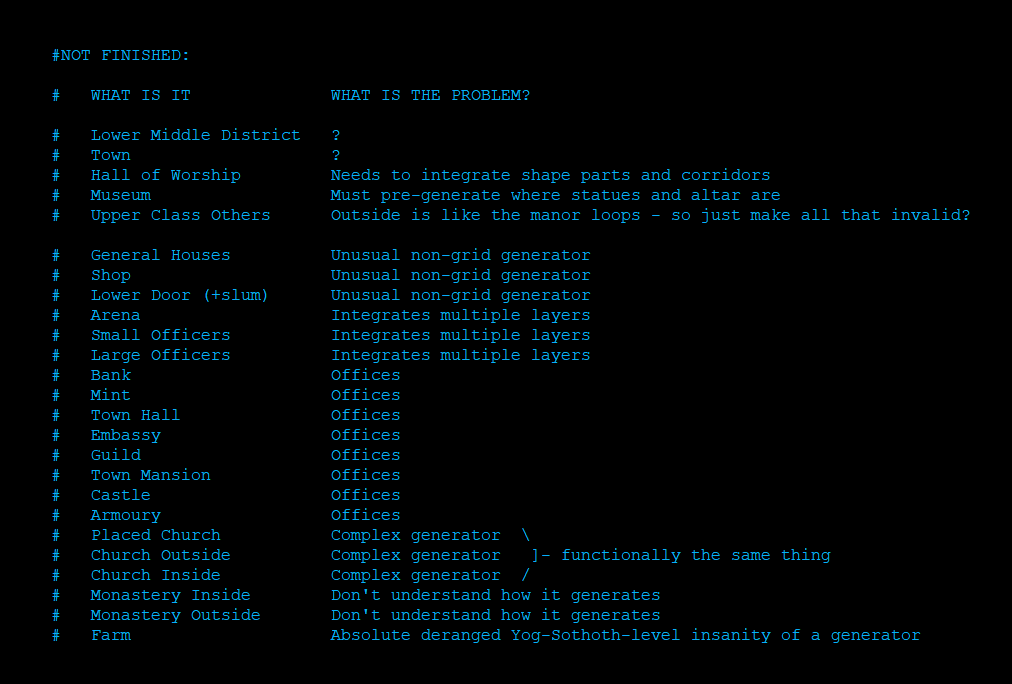
But as I say, once I reached this stage, the first five obviously stood out to me. The first two – every outside building in lower-class and middle-class housing districts in cities, and the equivalent for towns – stood out to me because as I went over this list, I wasn’t actually sure… what the problem was? And indeed, I wasn’t sure whether there actually was some challenging extra facet here, or I just hadn’t finished them. So I obviously marked those down for immediate further investigation. As for the next three, halls of worship generate as basically a chain or collection of shapes (squares, octagons, etc) depending on the civilization and the number of gods they worship (i.e. this is a religious freedom thing only) and then connect those shapes, each of which is a room containing an altar for each god, into a single building. This generator isn’t ultra-complex, but it does have a number of moving pieces which aren’t all stored easily on a single grid, so that one would need a bit more attention. The museum, meanwhile, was very easy aide from the fact that some things in the museum are statues and there will always be one altar, but the rest are plinths… but the layout isn’t decided until you get there. That one, then, would need an additional – though not wildly complex – extra bit of code to decide which goes where, and why, before you actually get there. The “upper class others”, meanwhile, refers to parts of an upper-class housing district that might contain multiple mansions, and the problem here is that the code for handling the roads outside these – and where they join, split, or leave room for other things – is, like all the monastery code, genuinely so complex and so old that I honestly cannot understand it (even while it works perfectly). What this meant, however, is that a rather easy solution presented itself here, i.e. just register all the roads outside as “INVALID” – if a single invalid is registered when trying to create a local map clue, the game just tries again – and have all possible clues for those not include roads. This is truly trivial – it’s like saying 0.01% of the world’s possible generated spaces cannot contain local map clues – and so this seemed like an easy fix, and one nobody would ever notice anyway.
With all of that in mind, I then got onto these five. The lower-class and middle-class districts yielded pretty quickly as there indeed wasn’t a great deal there which actually needed doing, though there was some very silly and very old code which I was update to update at the same time in order to allow these to be disconnected from their original generator and somewhat abstracted out into the gigantic list of all generators. Then I moved onto towns, but discovered a few issues here that are going to keep from an easy implementation – for one, there seems to be some actual confusion in the use of some characters in the generative grids (particularly “.” which seems to enable roads to overlap in certain areas… when they shouldn’t?), which will need some experimentation to assess whether this is actually a bug, which will then need fixing, before it can be integrated here. The other problem here is that even if there’s no bug as such, I will have to change significant parts of these generative grids in order to distinguish between several conditions which are important when thinking in the abstract vs when actually physically generating the thing, and that is a low-brain but high-effort task I’m going to save for another day. Halls of Worship, meanwhile, I realised on reflection had essentially just a variant of the “office” problem (see below), so I just grouped them there while I ponder a good solution. Museums, however, proved very easy to handle, as I found a really crisp and pleasing way to have the game pre-populate the exact locations of things in the museum you start in before actually generating the museum, and one that doesn’t consume any generation time, but will immediately allow for a museum-based clue to actually be generated – so that’s all splendid, and now goes into the completed category. Finally, the “upper class others” seemed to have an easy solution as above, and indeed they did, where I just list a bunch of invalid characters (these super-complex road generation bits of code) and everything else is valid. In the process I had to make some minor changes to how the game works out which door should lead to which kind of mansion interior, but that didn’t take long, and with that done, these could be added to the completed list.
As a final thing on this, you’ll notice that some of these have the same “issues” – which I’ve labelled as “unusual non-grid generator”, “integrates multiple layers”, and “offices” (I’m not including religious buildings here since the generator is just a complex one-off, whose workings I understand perfectly, but which poses a few fairly interesting challenges for the pre-generation objectives here). The first of these refers to three buildings which don’t actually use grids in the same way the other buildings do to generate, but instead essentially take a map and then do a number of quite simple but quite specific functions to that grid in order to create what they’re creating – you’ll note the three building types there are very simple building shapes and have very simple interiors, which is why they can be done in this way. I don’t honestly remember why I decided to set them up in this way rather than using the same techniques I’d been using elsewhere, but I did, and they work fine, but they unfortunately simply cannot be added to the dictionary of generation elements in that current state. That means I’m going to need to rework those three generators – which shouldn’t be super complex, but will take a bit of time – before we can use that material for clues. The second category is the hardest by far, and honestly might require an entire rewrite until they could potentially in the future be used for clues. Those buildings have a number of overlapping generative grids from which different elements are chosen, with some taking precedent over others. For example, the arenas generate a grid of pillars, a grid of chairs, and then place them both into the game world, with pillar types overriding chair tiles, and otherwise the tiles from each grid being selected to spawn. It creates nice-looking areas, but again, can’t be put into this format. That’ll need some thought. The final category, and the biggest, is what I’m calling “offices” – these are generators which spawn later parts separately from the main part, often quite small sections. An example might be the mint or bank generators, which have rooms that can spawn “offices” (hence the general title I gave these), i.e. rooms with chairs and tables in them. Those are selected separately from everything else, and spawn in later, and thus again cannot be easily be handled because the main generative grid just has placeholders which the game parses as “spawn something here once you’re done spawning everything else”. This one is the most common of the remaining issues, even if the implementation varies from generator to generator, and I’m still pondering how to solve that one. A few solutions have presented themselves to me, but they’re not super-efficient, so I’m still pondering…
Testing the first one!
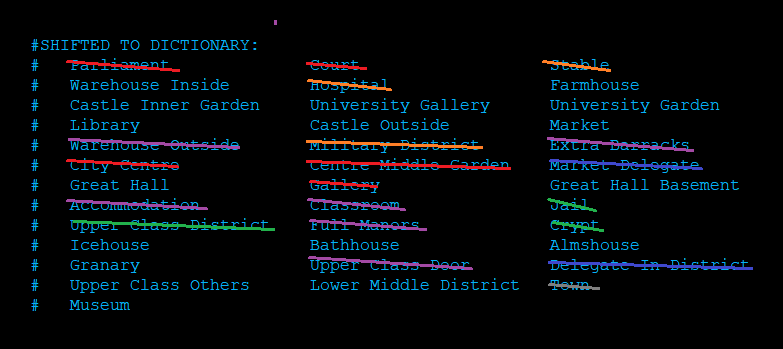
With all of this done, it was then time to decide which generator was going to have the lucky task of being the first generator to be tested here, i.e. where I would have the game pre-select generation options, create a clue from those generation options, and then have those options “forced” into the actual generator when its material is constructed. I took a look at the number of generators which had been successfully integrated into this kind of ur-dictionary of generators, and started to mark some off. A red line means they’d be more complicated than otherwise because of the way that city centres generate their terrain and “fit” all the required buildings into their grid, so those will need a little bit of extra code beyond the basis. An orange line means they’d be too complicated because the way that military districts generate, and so again, some extra code needed there. A purple line means that multiple copies of the same thing wll be generally spawning in the same map grid – e.g. lots of accommodation buildings on a university campus – and so, again, we need a way of distinguishing and forcing certain ones to be where we want them to be. The green lines were for “generator is just too complex” and again, special code will be needed there to handle each one individually. Dark blue, finally, was for things that don’t actually, er, spawn in the game right now, and so there’s no way to use them to test this system. Grey is for a set of generative components that I indeed put into the overall dictionary, but which still require a little bit of polish (I discovered a few slight discrepancies that might need fixing before I can use them for local clue generation). Once all of these were done we were left with a few where, by my understanding, the “simplest” possible implementation would be an option here, i.e. leaving a note on a map coordinate that a certain building (of which only one spawns, and which can spawn anywhere), must spawn in a certain orientation (if the clue is outside), and/or must spawn in a certain orientation and with a specific indoor layout grid (if the clue is inside, i.e. the outside and the inside must both be controlled, of course, to ensure the correct inside, whereas for an outside clue, the inside can be whatever, and it doesn’t affect the outside clue).
After a bit of pondering I decided to go with something with a relatively simple generator, and something that can be guaranteed in the player’s starting map grid – a university library. This will be easy for me to test by simply going to it as soon as I start a world, and because the code required for it is really very simple indeed. So, to start this, I’ve now created a new component of the game’s “tracker” functionality – which records everything from religions to maps to everything else – called forced_generation, which is a dictionary in which the keys will be map coordinates, and the entries will be whatever information is required to ensure the generation spawns correctly. So for the key (95,105) – i.e. something to do with map coordinates 95 on the x axis of the world map, and 105 on the y axis of the world map – an entry might be something like (‘Parliament’, 2, 0) – which would then be picked up by the game when generating that area, and trying to place the parliamentary building in a city centre. That entry says that the parliament must be of the second “type” (i.e. there are a bunch of shapes it can spawn in which then have more complex generators for the inside, and it would select the one labelled “2” rather than just picking at random when it generates) and then the 0 tells it what orientation the parliamentary building must be in when it generates (there are of course eight possible orientations for something without rotational symmetry on a square grid – four each rotated by 90 degrees, and then those same four, but in their mirror images). Then what I’ll be adding to the generator – and this will have to be done specially and uniquely for each generator, marking another challenging task which is the next thing on the list – the ability to check for these for the appropriate map grid and replace the correct numbers or other pieces of data with this pre-selected data. Then, with that done, it should, er… work? Yeah. It should just work! You’ll have a generated clue referencing a building that doesn’t yet, and then the building will be forced into the right state (layout, orientation, etc) when it generates! So at this point, all I need to do is write the very simple start of the generation function to select a building, create that clue, and then add to forced_generation the appropriate information…
What next?
…and that’s where I’m up to. Sorry for the cliffhanger, friends! But this is where I’m up to in the local map clues as of the last fortnight; indeed I was working pretty hard on these all the way up to this blog post’s deadline, which is why this blog entry is going live just a little bit later than normal (I think it’s still Sunday in some places, but I acknowledge it Monday in other places – whoops!). I really, really wanted to push forward to the point of having the first one tested by now, but on the other hand, let’s look on the bright side – it means the next time I post an update on these areas, I should have an absolute ton of them working, and tons of cool stuff to show off with the game generating local map clues, generating the area later on correctly in the way shown by the clue, and so forth. Thanks as ever for reading – this is a ton of work, but yields so many interesting riddle generation possibilities. Please do share it around if you think this is cool, and please do let me know your thoughts in the comments! I’ll see you in a fortnight for hopefully another huge chunk of 0.11’s remaining work done :).
I would’ve spent 20 hours writing an automated solution to save myself 10 hours of manual work, so you’re wiser than I am 🙂
Haha, thank you Alex! You have described *precisely* my chief fear had I gone down that path instead…
As a university librarian, using a University Library as a test for the clue generator warms my heart! It’s interesting to see how the game will use the generator dictionary/database to create locations later on, for clues that have already appeared. Very clever, and I can see that it’s quite a technical challenge to get it working smoothly.
I know exactly what you mean about how unlikely events (albeit not necessarily *rare* events, or even particularly important ones) happening in a game are actually a good thing that makes a game more interesting. It’s these moments that make the game memorable: when you encounter something particularly strange, beautiful, or just flat out unlikely, provided that it doesn’t break one’s suspension of disbelief (e.g., a locksmith’s guild building with a spaceship attached to it…unless there’s a good reason for it).
And I’m excited to see new unique civilization traits and the castles, mansions, crypts, and religious buildings interiors. As for the courts generating as empty rooms…well, that’s one way to speed up a trial!
Haha, I suspected as much! Thanks for the kind words crowbar; I’m pleased to say things continue to zoom along this fortnight and, as I write this, the first test will be happening over this coming weekend (turned out there were a ton of extra steps to be done first, and it made sense to continue filling out the database even more before moving onto the next steps, AND I spent some time working on another important 0.11 thing as well) and I’m very optimistic about its outcome. As for unlikely events, I’m continuing to ponder some of these and I have some fabulous ideas here, but those are definitely for another time… (also, ha, you’re quite right!)
Making sure interior maps always generate abyss tiles outside the building is a small detail that will save players a lot of confusion with the clues. Hundreds of generators feeding one translation function sounds like a tidy way to keep it all readable.
Hello Simon, welcome! Thanks for the comment, and I think you are quite right.